


Essential AI Studios to Know
Artificial intelligence (AI) has transitioned from a futuristic concept to a practical tool in technology's evolution. As AI becomes increasingly integrated into various sectors, understanding the leading studios in the AI landscape is crucial. These studios are not just improving existing systems; they are pioneering new ways for technology to serve business and society. But amidst a plethora of innovators, which ones are truly setting the pace?
This article aims to highlight the top 5 AI studios that stand out for their remarkable contributions to the field of artificial intelligence. We will take a closer look at how each studio is carving out a niche in this competitive market, whether through DeepBrain AI's innovative strategies, Google's AI Platform with its cloud-based solutions for developers and businesses, Microsoft Azure Machine Learning Studio's versatile tools, IBM Watson Studio's advanced cognitive capabilities, or Amazon SageMaker's efforts to make machine learning more accessible. Let’s dive into the details of what makes these AI studios leaders in their field and how they might influence your future technology choices.
Top 5 AI Studios at a Glance
Discover the forefront of AI technology with studios that blend innovation and user-friendliness:
- DeepBrain AI Studios: Lifelike AI videos with a free plan and intuitive editing.
- Google Cloud AI Studio: Versatile AI development with seamless cloud integration.
- Azure Machine Learning Studio: Drag-and-drop machine learning with a free tier.
- IBM Watson Studio: Collaborative AI projects with IBM Cloud synergy.
- Amazon SageMaker: Streamlined machine learning lifecycle within AWS ecosystem.
These AI studios are shaping the future, making cutting-edge technology available to developers and creators worldwide.
1. DeepBrain AI's AI Studios
DeepBrain AI's AI Studios is at the forefront of the video production landscape, redefining how we create and interact with digital content. With the launch of AI Studios 3.3, the platform has introduced a suite of AI-powered tools that enhance the video creation process. This guide will walk you through the standout features, subscription plans, and provide a balanced assessment of the platform's advantages and limitations.
Key Features
With AI Studios 3.3, users gain access to a robust set of features designed to facilitate video production:
- Extensive AI Avatar Library: Over 150 avatars ready for use, plus options to create custom avatars.
- Multilingual Voice Options: A voice library encompassing more than 80 languages, enabling global reach.
- User-Friendly Interface: An intuitive design that simplifies the video creation process for users of all skill levels.
- Avatar Customization: Capabilities to turn photos into talking avatars or to design bespoke avatars for unique projects.
- Integrated Content Tools: Upload slides and extract video highlights with ease, enhancing the content creation experience.
- Automated Video Series Production: Create a series of videos with consistency and efficiency through automation.
Pricing Structure
Whether you're starting small or scaling up, AI Studios has a pricing plan to match your ambitions. DeepBrain AI's AI Studios offers both monthly and yearly subscriptions to fit various user needs and budgets. Here's a detailed look at the subscription tiers, including the latest additions to the pricing model:
Monthly Subscription Plans
For those who prefer flexibility or are still discovering everything AI Studios has to offer, monthly plans are ideal:
(Enterprise plan pricing is customized. Contact sales for more information.)
Yearly Subscription Plans
Yearly plans are perfect for those committed to long-term use, offering savings compared to monthly rates:
(Prices are per month when billed annually.)
Free Plan
AI Studios also offers a free plan, allowing new users to experience the platform's basic features without immediate investment. This is a great way to get acquainted with the AI video production tools and assess how they can fit into your workflow.

Pros and Cons: Weighing Your Options
Every tool has its strengths and areas for improvement. Here's an objective look at what AI Studios offers:
Pros:
- Diverse Avatar Selection: The vast range of avatars caters to different video production needs.
- Multilingual Support: The extensive voice library enables content creators to reach a global audience.
- Intuitive Platform: The user-friendly interface ensures that even those new to video editing can produce high-quality content.
- Personalization: The ability to create custom avatars and photo avatars allows for unique and personalized video experiences.
Cons:
- The free plan offers a taste of AI Studios, with more advanced features reserved for paid plans.
- Mastering the platform's full capabilities may require some initial learning.
DeepBrain AI's AI Studios is a formidable platform for those looking to incorporate AI into their video production workflow. Its intuitive design and extensive features cater to a broad audience, while the flexible pricing and free plan reflect a commitment to making AI video production accessible to all.
2. Google AI Platform (Google Cloud AI Studio)

Google AI Platform, also known as Google Cloud AI Studio, is a comprehensive suite for AI development that integrates seamlessly with Google Cloud's suite of services. It's designed to accommodate both novice and experienced users with its user-friendly interface and advanced tools. The platform supports a wide array of machine learning frameworks, making it a versatile choice for building and deploying AI models at scale.
Key Features
Google Cloud AI Studio is a marvel of AI development, offering a suite of features that cater to both novice and experienced practitioners:
- Integrated Cloud Services: A seamless connection with Google Cloud services enhances data processing and model deployment.
- Versatile Framework Support: The platform's compatibility with multiple machine learning frameworks makes it a versatile choice for any AI project.
- Scalable Machine Learning Models: Users can leverage both pre-trained models and the tools to train custom models, accommodating a wide range of applications.
Pricing Structure
Google Cloud AI Studio provides a flexible pricing model, designed to fit the varied demands of its users. Here's a detailed look at their subscription tiers:
Free Plan
Google Cloud AI Studio also offers a free plan to help new users familiarize themselves with the platform's capabilities. This plan is an excellent starting point for those looking to understand how Google's AI tools can fit into their workflow.
%2520(1).jpeg)
Pros and Cons
Google Cloud AI Studio is a comprehensive solution, but it's essential to consider both sides of the coin:
Pros
- A user-friendly interface that caters to all experience levels.
- A broad selection of machine learning frameworks and models.
- Strong integration with Google Cloud services.
Considerations
- The free tier provides a snapshot of the platform's capabilities, with more advanced features reserved for paid plans.
- Users may need to familiarize themselves with Google Cloud's pricing structure to manage costs effectively.
Google Cloud AI Studio positions itself as a robust platform for those looking to harness the power of AI in their projects. Its intuitive interface, coupled with a comprehensive set of features, makes it suitable for a wide audience. The flexible pricing and the free tier reflect Google's commitment to making AI development accessible. Whether you are taking your first steps in AI or scaling up your existing operations, Google Cloud AI Studio is equipped to meet your needs.
3. Microsoft Azure Machine Learning Studio
.jpeg)
Microsoft Azure Machine Learning Studio revolutionizes the way we approach machine learning by offering a cloud-based environment that simplifies model development and deployment. With its no-code visual interface, users can effortlessly drag and drop modules to create experiments. This feature democratizes machine learning, making it accessible to users without deep technical expertise. Azure Machine Learning Studio is an integral part of Microsoft's Azure cloud services, providing a scalable platform for crafting AI solutions.
Key Features
Azure Machine Learning Studio boasts features that streamline the creation of machine learning models:
- No-Code Visual Interface: Simplifies the model-building process with an intuitive drag-and-drop approach.
- Framework Compatibility: Supports a variety of popular machine learning frameworks.
- Azure Integration: Offers seamless integration with other Azure services for comprehensive end-to-end solutions.
Pricing Structure
Azure Machine Learning Studio's pricing is structured to accommodate the diverse needs of its users, from small-scale experiments to large enterprise deployments:
Getting Started
Dive into machine learning with Azure Machine Learning Studio by following these simple steps:
- Create an Azure Account: Sign up for Microsoft Azure and navigate to the Machine Learning Studio.
- Set Up a Workspace: Establish a new workspace or utilize an existing one to manage your machine learning endeavors.
- Build and Deploy Models: Employ the user-friendly drag-and-drop interface to assemble models and deploy them effortlessly.
Free Plan
Azure Machine Learning Studio offers a free plan that allows newcomers to explore the platform's core functionalities. This plan is perfect for individuals or teams starting their journey in machine learning, providing a risk-free environment to learn and experiment.
.jpeg)
Pros and Cons
When evaluating Azure Machine Learning Studio, it's critical to consider its strengths and potential drawbacks:
Pros
- User-friendly no-code interface
- Support for popular machine learning frameworks
- Robust integration with Azure's cloud ecosystem
Considerations
- Free tier limitations may necessitate an upgrade for more advanced projects
- Navigation of Azure's full suite of services may require a learning curve
Microsoft Azure Machine Learning Studio is a powerful ally for those looking to simplify their machine learning workflows. Its user-friendly interface and integration with Azure make it a strong candidate for businesses and individuals alike. The platform's flexible pricing and free tier are indicative of Microsoft's commitment to providing accessible AI tools. Whether you're a novice or a seasoned professional, Azure Machine Learning Studio is equipped to support your AI ambitions.
4. IBM Watson Studio

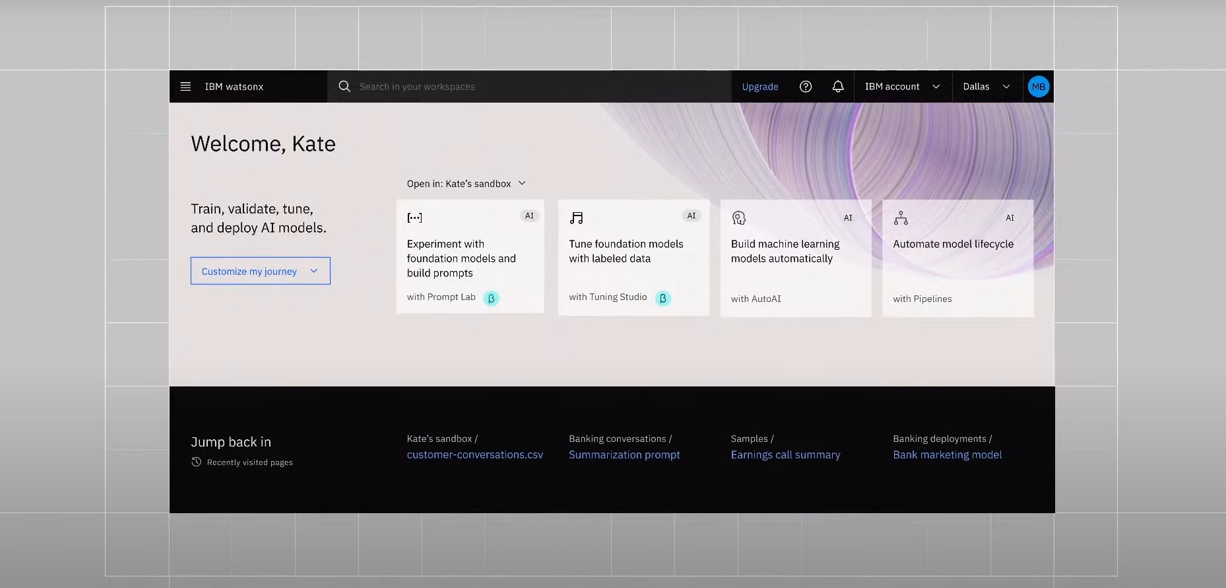
IBM Watson Studio stands as a comprehensive cloud platform that equips data scientists, application developers, and subject matter experts with a gamut of tools and capabilities for AI project collaboration. It facilitates the integration of various data sources and machine learning engines, allowing teams to work together effectively. As a part of IBM's Watson services, Watson Studio is acclaimed for its powerful AI and deep learning capabilities.
Key Features
Watson Studio is packed with features that support and enhance the AI development process:
- Collaborative Environment: Enables teams to work together on AI projects seamlessly.
- IBM Cloud Integration: Integrates with IBM Cloud services to provide a unified AI development experience.
- Advanced AI Capabilities: Offers access to pre-trained models and custom training options, leveraging IBM's AI expertise.
Pricing Structure
IBM Watson Studio offers a pricing model that can be tailored to the size and scope of your projects, ensuring that you have the resources you need:
Getting Started
Begin your AI development with IBM Watson Studio by following these steps:
- Sign Up for IBM Cloud: Register for an IBM Cloud account to gain access to Watson Studio.
- Create a New Project: Initiate a new project and select the necessary tools and services for your AI tasks.
- Build and Deploy Models: Take advantage of the intuitive interface to develop and roll out AI models with confidence.
Free Plan
IBM Watson Studio's Lite Plan is designed for those who want to explore the platform's capabilities without any financial commitment. This plan is ideal for learning and small-scale experimentation, providing a solid foundation for understanding AI model development and deployment.
Pros and Cons
When considering IBM Watson Studio for your AI projects, it's important to weigh both the advantages and limitations:
Pros
- A suite of tools designed for data scientists and developers
- Seamless integration with IBM Cloud services
- Access to both pre-trained and custom-trainable models
Considerations
- The Lite Plan may be too restrictive for complex projects, requiring an upgrade to a paid plan
- Users may need to navigate a learning curve to fully utilize IBM's suite of AI services
IBM Watson Studio offers a robust platform for collaborative AI development, backed by the strength of IBM's AI and machine learning heritage. With its versatile pricing options and a free plan, IBM Watson Studio is committed to making AI accessible to a broad audience. Whether you're an experienced professional or just starting out, Watson Studio provides the tools and environment to bring your AI projects to fruition.
5. Amazon SageMaker
.jpeg)
Amazon SageMaker is a fully managed service that empowers developers and data scientists to build, train, and deploy machine learning models rapidly. By removing the complexity of the underlying infrastructure, SageMaker significantly speeds up the machine learning lifecycle, from initial idea to production-ready models. As a part of the Amazon Web Services (AWS) ecosystem, it is renowned for its scalability and broad cloud functionality.
Key Features
SageMaker is designed to streamline the machine learning process with an array of powerful features:
- Fully Managed Service: Automates the heavy lifting involved in machine learning processes.
- Interactive Development: Supports Jupyter notebooks for an interactive development experience.
- AWS Integration: Works seamlessly with other AWS services to create comprehensive solutions.
Pricing Structure
Amazon SageMaker's pricing is designed to be as flexible as the machine learning models it helps to create, accommodating projects of all sizes:
Getting Started
Embark on your machine learning journey with Amazon SageMaker by following these simple steps:
- Create an AWS Account: Register with Amazon Web Services and locate SageMaker under the services menu.
- Launch a SageMaker Instance: Select an instance type that fits your project's requirements and configure it accordingly.
- Build, Train, and Deploy: Employ SageMaker's built-in algorithms or import your own to develop, train, and deploy your models.
Free Plan
Amazon SageMaker's Free Tier is an excellent starting point for those new to machine learning or AWS. It provides users with the opportunity to experiment with certain SageMaker features for 12 months without incurring any costs, making it perfect for learning and experimentation.
.jpeg)
Pros and Cons
As with any service, it's important to consider the strengths and potential challenges of using Amazon SageMaker:
Pros
- A comprehensive, fully managed service that simplifies the machine learning workflow
- Interactive development with support for Jupyter notebooks
- Seamless integration with the AWS ecosystem for end-to-end machine learning solutions
Considerations
- Service limits may require management and potential increase requests
- Optimizing model performance may involve fine-tuning datasets and parameters
Amazon SageMaker stands out as a powerful service for those looking to streamline their machine learning development. With its user-friendly interface, interactive development tools, and integration with AWS services, SageMaker is a strong choice for businesses and individuals seeking to accelerate their machine learning projects. Whether starting small or scaling up, SageMaker's flexible pricing and free tier offer a pathway for all to explore the capabilities of machine learning.
Final Overview: Leading Studios in Technology
In closing, AI studios have become significant players in the realms of digital content and machine learning. Platforms like DeepBrain AI Studios, Google Cloud AI Studio, Azure Machine Learning Studio, IBM Watson Studio, and Amazon SageMaker each bring something different to the table, making AI more accessible to a wider audience. They serve up a range of tools that enable everything from creating realistic videos to training efficient machine learning models. As AI integration becomes more widespread, these platforms stand out for their role in streamlining complex tasks and supporting a broad spectrum of users in their creative and technical endeavors.





